



报告器
Vitest 提供了多种内置报告器,用于以不同格式显示测试输出,同时也支持使用自定义报告器。你可以通过 --reporter 命令行选项来选择不同的报告器,或者在你的配置文件中添加 reporters 属性。如果未指定报告器,Vitest 会根据环境自动选择报告器。
通过命令行使用报告器:
npx vitest --reporter=verbose通过 vitest.config.ts 使用报告器:
import { defineConfig } from 'vitest/config'

export default defineConfig({
  test: {
    reporters: ['verbose']
  },
})
某些报告器可以通过传递额外选项进行自定义。特定于报告器的选项将在以下部分中描述。
export default defineConfig({
  test: {
    reporters: [
      'default',
      ['junit', { suiteName: 'UI 测试' }]
    ],
  },
})
默认配置
当未配置 reporters 时,Vitest 将使用以下报告器:
- 在普通终端运行中使用
default - 当 Vitest 检测到 AI 编码代理时使用
minimal - 当
process.env.GITHUB_ACTIONS === 'true'时添加github-actions
如果配置了自定义报告器,配置的列表将替换默认列表。如果希望在保留 Vitest 默认值的同时添加报告器,请扩展 configDefaults.reporters:
import { configDefaults, defineConfig } from 'vitest/config'

export default defineConfig({
  test: {
    reporters: ['json', ...configDefaults.reporters],
  },
})
报告器输出
默认情况下,Vitest 的报告器会将输出打印到终端。json、junit 和 html 报告器则会将输出写入 .vitest/ 下的指定位置:
json写入.vitest/json/output.jsonjunit写入.vitest/junit/output.xmlhtml写入.vitest/index.html
json 和 junit 的位置可以通过 Vitest 配置文件中的 outputFile 配置选项 或 CLI 进行覆盖。html 报告器则使用其 outputDir 选项。
npx vitest --reporter=json --outputFile=./test-output.jsonexport default defineConfig({
test: {
reporters: ['json'],
outputFile: './test-output.json'
},
})json 和 junit 报告器也接受将 outputFile 作为报告器选项,此时它的优先级高于顶层的 outputFile:
export default defineConfig({
  test: {
    reporters: [['json', { outputFile: './test-output.json' }]],
  },
})
要将报告打印到终端,而不是写入文件,请在 json 或 junit 报告器上设置 stdout 选项。当设置了 outputFile 时,该选项会被忽略:
export default defineConfig({
  test: {
    reporters: [['json', { stdout: true }]],
  },
})
WARNING
启用 stdout 时,报告可能会与其他直接写入终端的输出交错在一起——例如测试文件中的 process.stdout.write,或主进程中的日志(如全局设置文件)——这可能导致 JSON 或 XML 无法解析。在需要以程序方式消费报告时,建议优先使用默认的文件输出。
组合报告器
你可以同时使用多个报告器以不同格式打印测试结果。例如:
npx vitest --reporter=json --reporter=defaultimport { configDefaults, defineConfig } from 'vitest/config'
export default defineConfig({
test: {
reporters: ['json', ...configDefaults.reporters],
outputFile: './test-output.json'
},
})上面的示例将以默认样式将测试结果打印到终端,并将它们作为 JSON 写入指定的输出文件。
当使用多个报告器时,也可以指定多个输出文件,如下所示:
export default defineConfig({
  test: {
    reporters: ['junit', 'json', 'verbose'],
    outputFile: {
      junit: './junit-report.xml',
      json: './json-report.json',
    },
  },
})
此示例将写入单独的 JSON 和 XML 报告,并向终端打印详细报告。
内置报告器
默认报告器
default 报告器会在底部显示正在运行的测试摘要及其状态。一旦某个套件通过,其状态将显示在摘要上方。
你可以通过配置报告器来禁用摘要:
export default defineConfig({
  test: {
    reporters: [
      ['default', { summary: false }]
    ]
  },
})
测试进行中的示例输出:
 ✓ test/example-1.test.ts (5 tests | 1 skipped) 306ms
 ✓ test/example-2.test.ts (5 tests | 1 skipped) 307ms

 ❯ test/example-3.test.ts 3/5
 ❯ test/example-4.test.ts 1/5

 Test Files 2 passed (4)
      Tests 10 passed | 3 skipped (65)
   Start at 11:01:36
   Duration 2.00s
测试完成后的最终输出:
 ✓ test/example-1.test.ts (5 tests | 1 skipped) 306ms
 ✓ test/example-2.test.ts (5 tests | 1 skipped) 307ms
 ✓ test/example-3.test.ts (5 tests | 1 skipped) 307ms
 ✓ test/example-4.test.ts (5 tests | 1 skipped) 307ms

 Test Files  4 passed (4)
      Tests  16 passed | 4 skipped (20)
   Start at  12:34:32
   Duration  1.26s (transform 35ms, setup 1ms, collect 90ms, tests 1.47s, environment 0ms, prepare 267ms)
如果只有一个测试文件正在运行,Vitest 将输出该文件的完整测试树,类似于 tree 报告器。如果文件中至少有一个失败的测试,默认报告器也会打印测试树。
✓ __tests__/file1.test.ts (2) 725ms
   ✓ first test file (2) 725ms
     ✓ 2 + 2 should equal 4
     ✓ 4 - 2 should equal 2

 Test Files  1 passed (1)
      Tests  2 passed (2)
   Start at  12:34:32
   Duration  1.26s (transform 35ms, setup 1ms, collect 90ms, tests 1.47s, environment 0ms, prepare 267ms)
详细报告器
详细报告器在每个测试用例完成后打印该用例。它不会单独报告套件或文件。如果启用了 --includeTaskLocation,它还将在输出中包含每个测试的位置。与 default 报告器类似,你可以通过配置报告器来禁用摘要。
除此之外,verbose 报告器会立即打印测试错误消息。完整的测试错误将在测试运行结束时报告。
这是唯一一个在测试未失败时报告 注解 的终端报告器。
npx vitest --reporter=verboseexport default defineConfig({
test: {
reporters: [
['verbose', { summary: false }]
]
},
})示例输出:
✓ __tests__/file1.test.ts > first test file > 2 + 2 should equal 4 1ms
✓ __tests__/file1.test.ts > first test file > 4 - 2 should equal 2 1ms
✓ __tests__/file2.test.ts > second test file > 1 + 1 should equal 2 1ms
✓ __tests__/file2.test.ts > second test file > 2 - 1 should equal 1 1ms

 Test Files  2 passed (2)
      Tests  4 passed (4)
   Start at  12:34:32
   Duration  1.26s (transform 35ms, setup 1ms, collect 90ms, tests 1.47s, environment 0ms, prepare 267ms)
带有 --includeTaskLocation 的示例:
✓ __tests__/file1.test.ts:2 > first test file > 2 + 2 should equal 4 1ms
✓ __tests__/file1.test.ts:3 > first test file > 4 - 2 should equal 2 1ms
✓ __tests__/file2.test.ts:2 > second test file > 1 + 1 should equal 2 1ms
✓ __tests__/file2.test.ts:3 > second test file > 2 - 1 should equal 1 1ms

 Test Files  2 passed (2)
      Tests  4 passed (4)
   Start at  12:34:32
   Duration  1.26s (transform 35ms, setup 1ms, collect 90ms, tests 1.47s, environment 0ms, prepare 267ms)
树形报告器
树形报告器与 default 报告器相同,但它还会在套件完成后显示每个单独的测试。与 default 报告器类似,你可以通过配置报告器来禁用摘要。
npx vitest --reporter=treeexport default defineConfig({
test: {
reporters: [
['tree', { summary: false }]
]
},
})使用默认 slowTestThreshold: 300 的测试进行中示例输出:
 ✓ __tests__/example-1.test.ts (2) 725ms
   ✓ 第一个测试文件 (2) 725ms
     ✓ 2 + 2 应等于 4
     ✓ 4 - 2 应等于 2

 ❯ test/example-2.test.ts 3/5
   ↳ 应该运行超过三秒 1.57s
 ❯ test/example-3.test.ts 1/5

 测试文件 2 通过 (4)
      测试 10 通过 | 3 跳过 (65)
   开始于 11:01:36
   持续时间 2.00s
通过测试套件的最终终端输出示例:
✓ __tests__/file1.test.ts (2) 725ms
   ✓ 第一个测试文件 (2) 725ms
     ✓ 2 + 2 应等于 4
     ✓ 4 - 2 应等于 2
✓ __tests__/file2.test.ts (2) 746ms
  ✓ 第二个测试文件 (2) 746ms
    ✓ 1 + 1 应等于 2
    ✓ 2 - 1 应等于 1

 测试文件  2 通过 (2)
      测试  4 通过 (4)
   开始于  12:34:32
   持续时间  1.26s (transform 35ms, setup 1ms, collect 90ms, tests 1.47s, environment 0ms, prepare 267ms)
点状报告器
为每个完成的测试打印一个点,以提供最小化输出,同时仍显示所有已运行的测试。仅提供失败测试的详细信息,以及套件的摘要。
npx vitest --reporter=dotexport default defineConfig({
test: {
reporters: ['dot']
},
})通过测试套件的示例终端输出:
....

 Test Files  2 passed (2)
      Tests  4 passed (4)
   Start at  12:34:32
   Duration  1.26s (transform 35ms, setup 1ms, collect 90ms, tests 1.47s, environment 0ms, prepare 267ms)
JUnit 报告器
以 JUnit XML 格式输出测试结果报告。默认写入 .vitest/junit/output.xml。如需写入其他位置,可使用 outputFile 配置项或报告器自身的 outputFile 选项。若要改为直接打印到终端,请设置报告器的 stdout 选项。
npx vitest --reporter=junitexport default defineConfig({
test: {
reporters: ['junit']
},
})JUnit XML 报告示例:
<?xml version="1.0" encoding="UTF-8" ?>
<testsuites name="vitest tests" tests="2" failures="1" errors="0" time="0.503">
<testsuite name="__tests__/test-file-1.test.ts" timestamp="2023-10-19T17:41:58.580Z" hostname="My-Computer.local" tests="2" failures="1" errors="0" skipped="0" time="0.013">
<testcase classname="__tests__/test-file-1.test.ts" name="first test file > 2 + 2 should equal 4" time="0.01">
<failure message="expected 5 to be 4 // Object.is equality" type="AssertionError">
AssertionError: expected 5 to be 4 // Object.is equality
❯ __tests__/test-file-1.test.ts:20:28
</failure>
</testcase>
<testcase classname="__tests__/test-file-1.test.ts" name="first test file > 4 - 2 should equal 2" time="0">
</testcase>
</testsuite>
</testsuites>输出的 XML 包含嵌套的 testsuites → testsuite → testcase 标签。你可以使用以下选项自定义报告器行为:
| 选项 | 描述 | 默认值 |
|---|---|---|
suiteName | <testsuites> 的 name 属性 | "vitest tests" |
suiteNameTemplate | <testsuite> 的 name 属性模板。接受带占位符的字符串或函数。 | 相对文件路径 |
classnameTemplate | <testcase> 的 classname 属性模板。接受带占位符的字符串或函数。 | 相对文件路径 |
titleTemplate | <testcase> 的 name 属性模板。接受带占位符的字符串或函数。 | 带祖先层级的完整测试标题 |
ancestorSeparator | 在 {classname} 占位符以及默认测试标题中,连接祖先 describe 块名称时使用的分隔符。 | " > " |
addFileAttribute | 为每个 <testcase> 添加 file 属性。 | false |
includeConsoleOutput | 包含 <system-out> / <system-err> 控制台输出。 | true |
stackTrace | 在 <failure> 元素中包含堆栈跟踪。 | true |
以下占位符可用于 suiteNameTemplate:
{title}– 第一个顶层describe块的名称;如果没有顶层describe,则回退为文件基本名{filename}– 相对于根目录的文件路径(例如src/foo.test.ts){filepath}– 绝对文件路径{basename}– 不含目录的文件名(例如foo.test.ts){displayName}– Vitest 项目名称
以下占位符可用于 classnameTemplate 和 titleTemplate:
{classname}– 使用ancestorSeparator连接的祖先describe块名称(例如outer > inner){title}– 叶子测试标题(传递给it/test的字符串){suitename}– 顶层describe块名称;当测试没有外层describe时为空字符串{filename}– 相对于根目录的文件路径{filepath}– 绝对文件路径{basename}– 不含目录的文件名{displayName}– Vitest 项目名称
TIP
{filename} 遵循 Vitest 的约定,解析为相对于项目根目录的相对路径(例如 src/foo.test.ts)。这与 jest-junit 不同,后者中的 {filename} 是纯文件名。若只想获取文件名,请使用 {basename}。
export default defineConfig({
  test: {
    reporters: [
      ['junit', {
        suiteName: 'My Test Suite',
        // 使用第一个顶层 describe 块名称作为 testsuite 名称
        suiteNameTemplate: '{title}',
        // classname = 祖先 describe 链
        classnameTemplate: '{classname}',
        // name = 仅叶子测试标题(兼容 jest-junit)
        titleTemplate: '{title}',
        ancestorSeparator: ' > ',
      }]
    ]
  },
})
基于函数的模板会接收所有可用变量并可返回任意字符串:
export default defineConfig({
  test: {
    reporters: [
      ['junit', {
        classnameTemplate: ({ classname, filename }) =>
          classname ? `${filename}::${classname}` : filename,
        titleTemplate: ({ suitename, title }) =>
          suitename ? `[${suitename}] ${title}` : title,
      }]
    ]
  },
})
JSON 报告器
以与 Jest 的 --json 选项兼容的 JSON 格式生成测试结果报告。默认情况下,它会写入 .vitest/json/output.json。若要写到其他位置,请使用 outputFile 配置项或报告器自身的 outputFile 选项。若要改为输出到终端,请设置报告器的 stdout 选项。
npx vitest --reporter=jsonexport default defineConfig({
test: {
reporters: ['json']
},
})JSON 报告示例:
{
  "numTotalTestSuites": 4,
  "numPassedTestSuites": 2,
  "numFailedTestSuites": 1,
  "numPendingTestSuites": 1,
  "numTotalTests": 4,
  "numPassedTests": 1,
  "numFailedTests": 1,
  "numPendingTests": 1,
  "numTodoTests": 1,
  "startTime": 1697737019307,
  "success": false,
  "testResults": [
    {
      "assertionResults": [
        {
          "ancestorTitles": [
            "",
            "first test file"
          ],
          "fullName": " first test file 2 + 2 should equal 4",
          "status": "failed",
          "title": "2 + 2 should equal 4",
          "duration": 9,
          "failureMessages": [
            "expected 5 to be 4 // Object.is equality"
          ],
          "location": {
            "line": 20,
            "column": 28
          },
          "meta": {}
        }
      ],
      "startTime": 1697737019787,
      "endTime": 1697737019797,
      "status": "failed",
      "message": "",
      "name": "/root-directory/__tests__/test-file-1.test.ts"
    }
  ],
  "coverageMap": {}
}
INFO
自 Vitest 3 起,如果启用了覆盖率,JSON 报告器会在 coverageMap 中包含覆盖率信息。
每个断言结果中的 meta 字段可以通过 filterMeta 报告器选项进行过滤。它接收每个字段的键和值,并应返回一个假值以将该字段从报告中排除:
export default defineConfig({
  test: {
    reporters: [
      ['json', {
        filterMeta: (key, value) => key !== 'internalField',
      }]
    ]
  },
})
HTML 报告器
生成一个 HTML 文件,以便通过交互式 GUI 查看测试结果。文件生成后,Vitest 将保持本地开发服务器运行,并提供一个链接以便在浏览器中查看报告。
报告工件根目录可以使用报告器的 outputDir 选项指定。报告入口文件将写入 <outputDir>/index.html,而 UI 资源文件位于 <outputDir>/ui/ 下。默认情况下 outputDir 为 .vitest,即共享的 Vitest 工件目录,因此附件(.vitest/attachments)和覆盖率(.vitest/coverage)会被复用而不会被复制。
npx vitest --reporter=htmlexport default defineConfig({
test: {
reporters: ['html']
},
})设置 singleFile 以生成一个自包含的 HTML 报告:
export default defineConfig({
  test: {
    reporters: [
      ['html', { singleFile: true }],
    ],
  },
})
当启用 singleFile 时,Vitest 会将 UI 资源、元数据和测试附件内联到单个自包含的 index.html 中。这使得报告更易于作为一个工件进行分享、上传或下载,而无需保留整个 html 输出目录。
WARNING
singleFile 有两个注意事项:
- 由于所有内容都以内联方式嵌入,文件可能会变得非常大——打开速度慢、占用内存高,并且可能超过工件查看器或静态主机的大小限制。
- 覆盖率 HTML 报告目前尚未内联,仍会作为单独文件保留。
当套件包含许多或较大的附件,或者你需要将覆盖率包含在包中时,优先使用默认的多文件报告。
TIP
此报告器需要安装 @vitest/ui 包。
TAP 报告器
输出遵循 Test Anything Protocol (TAP) 的报告。
npx vitest --reporter=tapexport default defineConfig({
test: {
reporters: ['tap']
},
})TAP 报告示例:
TAP version 13
1..1
not ok 1 - __tests__/test-file-1.test.ts # time=14.00ms {
    1..1
    not ok 1 - first test file # time=13.00ms {
        1..2
        not ok 1 - 2 + 2 should equal 4 # time=11.00ms
            ---
            error:
                name: "AssertionError"
                message: "expected 5 to be 4 // Object.is equality"
            at: "/root-directory/__tests__/test-file-1.test.ts:20:28"
            actual: "5"
            expected: "4"
            ...
        ok 2 - 4 - 2 should equal 2 # time=1.00ms
    }
}
TAP 扁平报告器
输出 TAP 扁平报告。与 tap 报告器一样,测试结果格式化为遵循 TAP 标准,但测试套件格式化为扁平列表而不是嵌套层级。
npx vitest --reporter=tap-flatexport default defineConfig({
test: {
reporters: ['tap-flat']
},
})TAP 扁平报告示例:
TAP version 13
1..2
not ok 1 - __tests__/test-file-1.test.ts > first test file > 2 + 2 should equal 4 # time=11.00ms
    ---
    error:
        name: "AssertionError"
        message: "expected 5 to be 4 // Object.is equality"
    at: "/root-directory/__tests__/test-file-1.test.ts:20:28"
    actual: "5"
    expected: "4"
    ...
ok 2 - __tests__/test-file-1.test.ts > first test file > 4 - 2 should equal 2 # time=0.00ms
挂起进程报告器
显示挂起进程的列表(如果有进程阻止 Vitest 安全退出)。hanging-process 报告器本身不显示测试结果,但可以与另一个报告器结合使用,以在测试运行时监控进程。使用此报告器可能会消耗大量资源,因此通常应保留用于调试目的,适用于 Vitest 一直无法退出进程的情况。
npx vitest --reporter=hanging-processexport default defineConfig({
test: {
reporters: ['hanging-process']
},
})GitHub Actions 报告器
输出 工作流命令,为测试失败提供注解。此报告器在 process.env.GITHUB_ACTIONS === 'true' 时(在 GitHub Actions 环境中)会自动启用。
你可以通过使用 onWritePath 选项来自定义在 GitHub 注解命令格式 中打印的文件路径。当在容器化环境中运行 Vitest(例如 Docker)时,这很有用,因为文件路径可能与 GitHub Actions 环境中的路径不匹配。
export default defineConfig({
  test: {
    reporters: process.env.GITHUB_ACTIONS === 'true'
      ? [
          'default',
          ['github-actions', { onWritePath(path) {
            return path.replace(/^\/app\//, `${process.env.GITHUB_WORKSPACE}/`)
          } }],
        ]
      : ['default'],
  },
})
如果你使用 注解 API,报告器会自动将它们内联到 GitHub UI 中。你可以通过将 displayAnnotations 选项设置为 false 来禁用此功能:
export default defineConfig({
  test: {
    reporters: [
      ['github-actions', { displayAnnotations: false }],
    ],
  },
})
GitHub Actions 报告器会自动生成一个包含测试结果概览的 任务摘要。摘要包括测试文件和测试用例统计信息,并突出显示需要重试的不稳定测试。
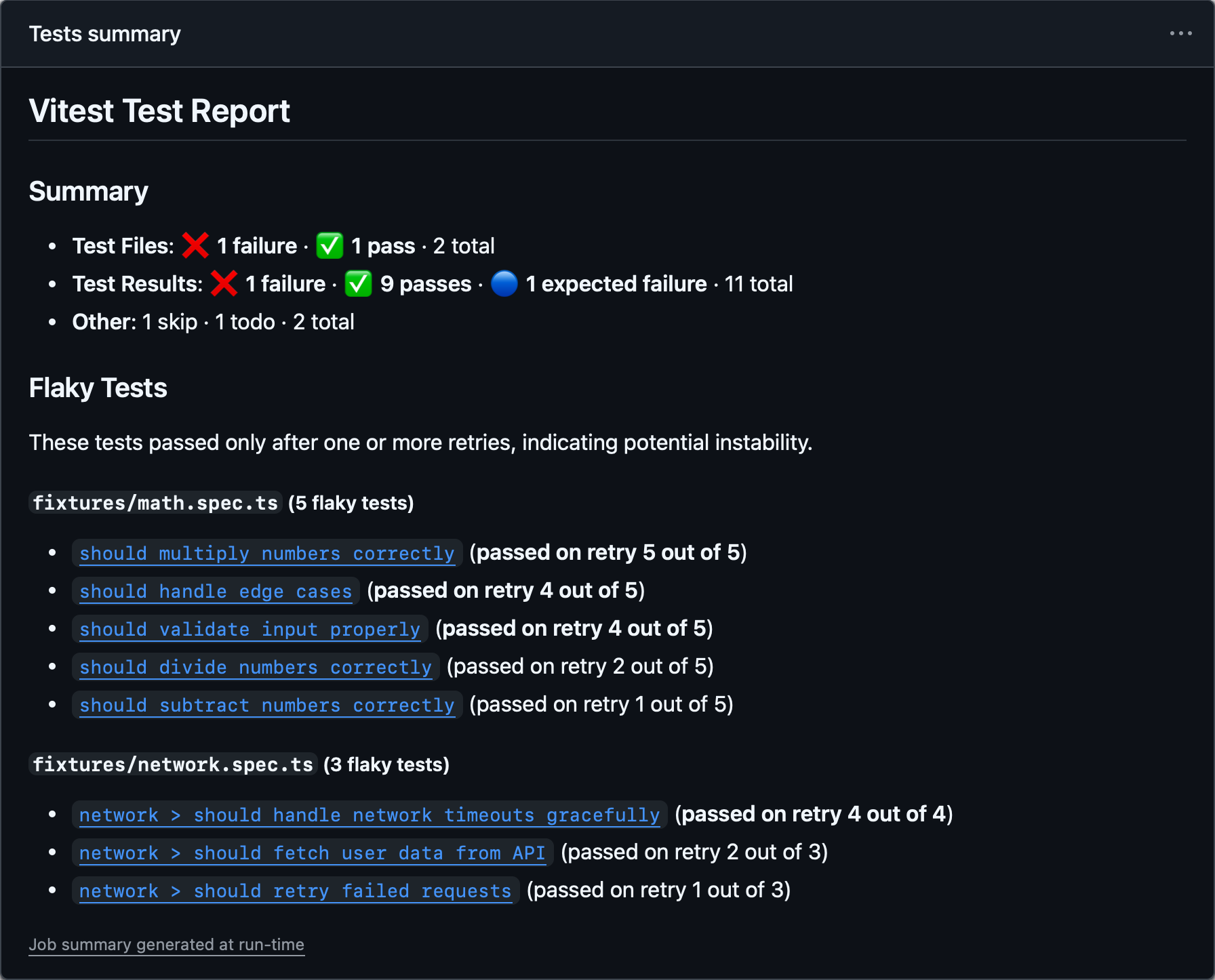
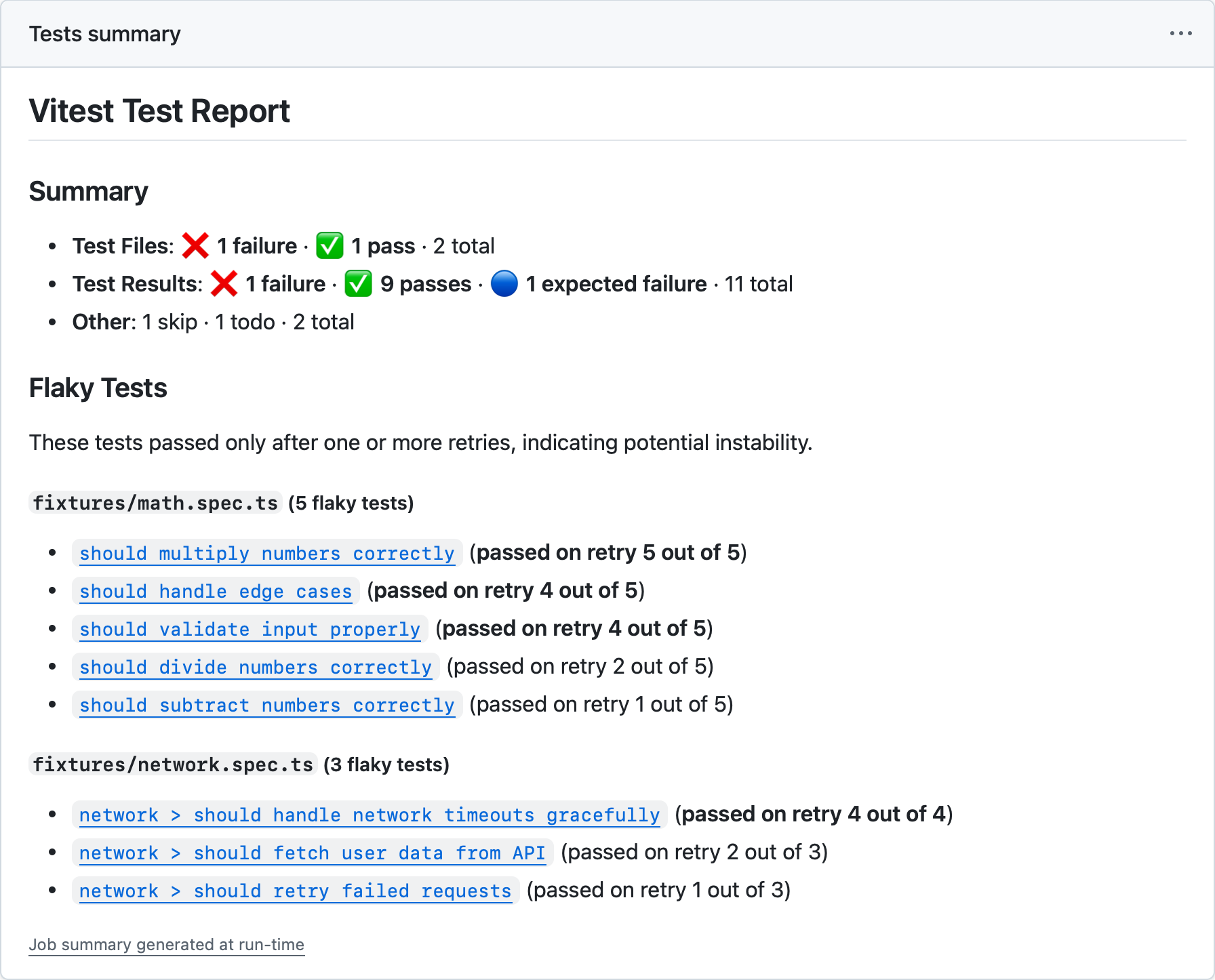
任务摘要默认启用,并写入 $GITHUB_STEP_SUMMARY 指定的路径。你可以使用 jobSummary.outputPath 选项覆盖它:
export default defineConfig({
  test: {
    reporters: [
      ['github-actions', {
        jobSummary: {
          outputPath: '/home/runner/jobs/summary/step',
        },
      }],
    ],
  },
})
要禁用任务摘要:
export default defineConfig({
  test: {
    reporters: [
      ['github-actions', { jobSummary: { enabled: false } }],
    ],
  },
})
任务摘要标题默认为 Vitest Test Report;当设置了 test.name 时,默认为 (${test.name}) Vitest Test Report。
你可以通过设置 jobSummary.title 自定义标题,以区分追加到同一任务摘要中的多个 Vitest 调用。请注意,使用自定义标题时不会显示 test.name。
export default defineConfig({
  test: {
    reporters: [
      ['github-actions', {
        jobSummary: {
          title: 'My Test Report',
        },
      }],
    ],
  },
})
摘要中的不稳定测试部分包含永久链接 URL,可将测试名称直接链接到 GitHub 上相关的源代码行。这些链接会自动使用 GitHub Actions 提供的环境变量($GITHUB_REPOSITORY、$GITHUB_SHA 和 $GITHUB_WORKSPACE)生成,因此大多数情况下无需配置。
如果你需要覆盖这些值——例如,在容器或自定义环境中运行时——你可以通过 fileLinks 选项自定义它们:
repository:owner/repo格式的 GitHub 仓库。默认为process.env.GITHUB_REPOSITORY。commitHash:用于永久链接 URL 的 commit SHA。默认为process.env.GITHUB_SHA。workspacePath:磁盘上仓库根目录的绝对路径。用于计算永久链接 URL 的相对文件路径。默认为process.env.GITHUB_WORKSPACE。
所有三个值都必须可用才能生成链接。
export default defineConfig({
  test: {
    reporters: [
      ['github-actions', {
        jobSummary: {
          fileLinks: {
            repository: 'owner/repo',
            commitHash: 'abcdefg',
            workspacePath: '/home/runner/work/repo/',
          },
        },
      }],
    ],
  },
})
最小报告器
- 别名:
agent
输出一个最小报告,只包含失败的测试及其错误消息。来自通过测试的控制台日志和摘要部分也会被抑制。
代理报告器
此报告器非常适合 AI 编码助手和基于 LLM 的工作流,可减少 token 使用量。当 Vitest 检测到正在 AI 编码代理中运行时,它会自动启用。
npx vitest --reporter=minimalexport default defineConfig({
test: {
reporters: ['minimal']
},
})Blob 报告器
将测试结果存储在本机上,以便之后使用 --merge-reports 命令进行合并。默认情况下,所有结果都会存储在 .vitest/blob/ 文件夹中,但可以使用 --outputFile 或 --outputFile.blob 标志覆盖。
npx vitest --reporter=blob --outputFile=reports/blob-1.json如果你在不同机器上使用 --shard 标志运行 Vitest,或者跨多个环境(例如 linux/macos/windows)运行,我们建议使用此报告器。所有 blob 报告都可以在 CI 流水线末尾通过 --merge-reports 命令合并为任意一种报告:
npx vitest --merge-reports=reports --reporter=json --reporter=default当在多个环境中运行相同测试时,请使用 VITEST_BLOB_LABEL 环境变量来区分各个环境的 blob。Vitest 会在合并时读取这些标签,并分别显示结果:
VITEST_BLOB_LABEL=linux vitest run --reporter=blob你也可以通过 blob 报告器选项提供标签。其优先级高于 VITEST_BLOB_LABEL。
import { defineConfig } from 'vitest/config'

export default defineConfig({
  test: {
    reporters: [
      ['blob', { label: 'linux' }],
    ],
  },
})
Blob 报告器输出不包含基于文件的 附件。 使用此功能时,请务必在 CI 中将 attachmentsDir 与 blob 报告一起单独合并。
TIP
--reporter=blob 和 --merge-reports 都不适用于监听模式。